mirror of
https://github.com/carlospolop/privilege-escalation-awesome-scripts-suite.git
synced 2025-12-08 18:11:29 +00:00
Compare commits
1 Commits
20220206
...
refs/pull/
| Author | SHA1 | Date | |
|---|---|---|---|

|
053402eb41 |
27
.github/workflows/CI-master_tests.yml
vendored
27
.github/workflows/CI-master_tests.yml
vendored
@@ -5,9 +5,6 @@ on:
|
|||||||
branches:
|
branches:
|
||||||
- master
|
- master
|
||||||
|
|
||||||
schedule:
|
|
||||||
- cron: "5 4 * * SUN"
|
|
||||||
|
|
||||||
workflow_dispatch:
|
workflow_dispatch:
|
||||||
|
|
||||||
jobs:
|
jobs:
|
||||||
@@ -87,9 +84,9 @@ jobs:
|
|||||||
# copy the files
|
# copy the files
|
||||||
- name: Copy Dotfuscator generated files
|
- name: Copy Dotfuscator generated files
|
||||||
run: |
|
run: |
|
||||||
cp $env:DotFuscatorGeneratedPath\x64\winPEASx64.exe "winPEAS\winPEASexe\binaries\Obfuscated Releases\winPEASx64_ofs.exe"
|
cp $env:DotFuscatorGeneratedPath\x64\winPEASx64.exe "winPEAS\winPEASexe\binaries\Obfuscated Releases\winPEASx64.exe"
|
||||||
cp $env:DotFuscatorGeneratedPath\x86\winPEASx86.exe "winPEAS\winPEASexe\binaries\Obfuscated Releases\winPEASx86_ofs.exe"
|
cp $env:DotFuscatorGeneratedPath\x86\winPEASx86.exe "winPEAS\winPEASexe\binaries\Obfuscated Releases\winPEASx86.exe"
|
||||||
cp $env:DotFuscatorGeneratedPath\any\winPEASany.exe "winPEAS\winPEASexe\binaries\Obfuscated Releases\winPEASany_ofs.exe"
|
cp $env:DotFuscatorGeneratedPath\any\winPEASany.exe "winPEAS\winPEASexe\binaries\Obfuscated Releases\winPEASany.exe"
|
||||||
|
|
||||||
# Upload all the versions for the release
|
# Upload all the versions for the release
|
||||||
- name: Upload winpeasx64
|
- name: Upload winpeasx64
|
||||||
@@ -114,19 +111,19 @@ jobs:
|
|||||||
uses: actions/upload-artifact@v2
|
uses: actions/upload-artifact@v2
|
||||||
with:
|
with:
|
||||||
name: winPEASx64_ofs.exe
|
name: winPEASx64_ofs.exe
|
||||||
path: winPEAS\winPEASexe\binaries\Obfuscated Releases\winPEASx64_ofs.exe
|
path: winPEAS\winPEASexe\binaries\Obfuscated Releases\winPEASx64.exe
|
||||||
|
|
||||||
- name: Upload winpeasx86ofs
|
- name: Upload winpeasx86ofs
|
||||||
uses: actions/upload-artifact@v2
|
uses: actions/upload-artifact@v2
|
||||||
with:
|
with:
|
||||||
name: winPEASx86_ofs.exe
|
name: winPEASx86_ofs.exe
|
||||||
path: winPEAS\winPEASexe\binaries\Obfuscated Releases\winPEASx86_ofs.exe
|
path: winPEAS\winPEASexe\binaries\Obfuscated Releases\winPEASx86.exe
|
||||||
|
|
||||||
- name: Upload winpeasanyofs
|
- name: Upload winpeasanyofs
|
||||||
uses: actions/upload-artifact@v2
|
uses: actions/upload-artifact@v2
|
||||||
with:
|
with:
|
||||||
name: winPEASany_ofs.exe
|
name: winPEASany_ofs.exe
|
||||||
path: winPEAS\winPEASexe\binaries\Obfuscated Releases\winPEASany_ofs.exe
|
path: winPEAS\winPEASexe\binaries\Obfuscated Releases\winPEASany.exe
|
||||||
|
|
||||||
- name: Upload winpeas.bat
|
- name: Upload winpeas.bat
|
||||||
uses: actions/upload-artifact@v2
|
uses: actions/upload-artifact@v2
|
||||||
@@ -199,7 +196,7 @@ jobs:
|
|||||||
|
|
||||||
# Run linpeas as a test
|
# Run linpeas as a test
|
||||||
- name: Run linpeas
|
- name: Run linpeas
|
||||||
run: linPEAS/linpeas.sh -a -D
|
run: linPEAS/linpeas.sh -a -v
|
||||||
|
|
||||||
# Upload files for release
|
# Upload files for release
|
||||||
- name: Upload linpeas.sh
|
- name: Upload linpeas.sh
|
||||||
@@ -286,7 +283,7 @@ jobs:
|
|||||||
|
|
||||||
# Run macpeas parts to test it
|
# Run macpeas parts to test it
|
||||||
- name: Run macpeas
|
- name: Run macpeas
|
||||||
run: linPEAS/linpeas.sh -D -o system_information,container,procs_crons_timers_srvcs_sockets,network_information,users_information,software_information
|
run: linPEAS/linpeas.sh -v -o system_information,container,procs_crons_timers_srvcs_sockets,network_information,users_information,software_information
|
||||||
|
|
||||||
|
|
||||||
Publish_release:
|
Publish_release:
|
||||||
@@ -365,10 +362,6 @@ jobs:
|
|||||||
with:
|
with:
|
||||||
name: linpeas_darwin_arm64
|
name: linpeas_darwin_arm64
|
||||||
|
|
||||||
- name: Get current date
|
|
||||||
id: date
|
|
||||||
run: echo "::set-output name=date::$(date +'%Y%m%d')"
|
|
||||||
|
|
||||||
# Create the release
|
# Create the release
|
||||||
- name: Create Release
|
- name: Create Release
|
||||||
id: create_release
|
id: create_release
|
||||||
@@ -376,8 +369,8 @@ jobs:
|
|||||||
env:
|
env:
|
||||||
GITHUB_TOKEN: ${{ secrets.GITHUB_TOKEN }}
|
GITHUB_TOKEN: ${{ secrets.GITHUB_TOKEN }}
|
||||||
with:
|
with:
|
||||||
tag_name: ${{steps.date.outputs.date}}
|
tag_name: ${{ github.ref }}
|
||||||
release_name: Release ${{ github.ref }} ${{steps.date.outputs.date}}
|
release_name: Release ${{ github.ref }}
|
||||||
draft: false
|
draft: false
|
||||||
prerelease: false
|
prerelease: false
|
||||||
|
|
||||||
|
|||||||
@@ -17,7 +17,9 @@ Find the **latest versions of all the scripts and binaries in [the releases page
|
|||||||
|
|
||||||
```bash
|
```bash
|
||||||
# From github
|
# From github
|
||||||
curl -L https://github.com/carlospolop/PEASS-ng/releases/latest/download/linpeas.sh | sh
|
LATEST_RELEASE=$(curl -L -s -H 'Accept: application/json' https://github.com/carlospolop/PEASS-ng/releases/latest)
|
||||||
|
LATEST_VERSION=$(echo $LATEST_RELEASE | sed -e 's/.*"tag_name":"\([^"]*\)".*/\1/')
|
||||||
|
curl -L https://github.com/carlospolop/PEASS-ng/releases/download/$LATEST_VERSION/linpeas.sh | sh
|
||||||
```
|
```
|
||||||
|
|
||||||
```bash
|
```bash
|
||||||
@@ -42,7 +44,7 @@ less -r /dev/shm/linpeas.txt #Read with colors
|
|||||||
|
|
||||||
```bash
|
```bash
|
||||||
# Use a linpeas binary
|
# Use a linpeas binary
|
||||||
wget https://github.com/carlospolop/PEASS-ng/releases/latest/download/linpeas_linux_amd64
|
wget https://github.com/carlospolop/PEASS-ng/releases/download/refs%2Fheads%2Fmaster/linpeas_linux_amd64
|
||||||
chmod +x linpeas_linux_amd64
|
chmod +x linpeas_linux_amd64
|
||||||
./linpeas_linux_amd64
|
./linpeas_linux_amd64
|
||||||
```
|
```
|
||||||
@@ -203,5 +205,8 @@ If you find any issue, please report it using **[github issues](https://github.c
|
|||||||
|
|
||||||
All the scripts/binaries of the PEAS Suite should be used for authorized penetration testing and/or educational purposes only. Any misuse of this software will not be the responsibility of the author or of any other collaborator. Use it at your own networks and/or with the network owner's permission.
|
All the scripts/binaries of the PEAS Suite should be used for authorized penetration testing and/or educational purposes only. Any misuse of this software will not be the responsibility of the author or of any other collaborator. Use it at your own networks and/or with the network owner's permission.
|
||||||
|
|
||||||
|
## License
|
||||||
|
|
||||||
|
MIT License
|
||||||
|
|
||||||
By Polop<sup>(TM)</sup>
|
By Polop<sup>(TM)</sup>
|
||||||
@@ -21,17 +21,6 @@ else echo_not_found "sudo"
|
|||||||
fi
|
fi
|
||||||
echo ""
|
echo ""
|
||||||
|
|
||||||
#-- SY) CVE-2021-4034
|
|
||||||
if [ `command -v pkexec` ] && stat -c '%a' $(which pkexec) | grep -q 4755 && [ "$(stat -c '%Y' $(which pkexec))" -lt "1642035600" ]; then
|
|
||||||
echo "Vulnerable to CVE-2021-4034" | sed -${E} "s,.*,${SED_RED_YELLOW},"
|
|
||||||
fi
|
|
||||||
|
|
||||||
#-- SY) CVE-2021-3560
|
|
||||||
polkitVersion=$(systemctl status polkit.service | grep version | cut -d " " -f 9)
|
|
||||||
if [[ "$(apt list --installed 2>/dev/null | grep polkit | grep -c 0.105-26)" -ge 1 || "$(yum list installed | grep polkit | grep -c 0.117-2)" ]]; then
|
|
||||||
echo "Vulnerable to CVE-2021-3560" | sed -${E} "s,.*,${SED_RED_YELLOW},"
|
|
||||||
fi
|
|
||||||
|
|
||||||
#--SY) USBCreator
|
#--SY) USBCreator
|
||||||
if (busctl list 2>/dev/null | grep -q com.ubuntu.USBCreator) || [ "$DEBUG" ]; then
|
if (busctl list 2>/dev/null | grep -q com.ubuntu.USBCreator) || [ "$DEBUG" ]; then
|
||||||
print_2title "USBCreator"
|
print_2title "USBCreator"
|
||||||
@@ -133,10 +122,9 @@ if [ "$(command -v bash 2>/dev/null)" ]; then
|
|||||||
print_2title "Executing Linux Exploit Suggester"
|
print_2title "Executing Linux Exploit Suggester"
|
||||||
print_info "https://github.com/mzet-/linux-exploit-suggester"
|
print_info "https://github.com/mzet-/linux-exploit-suggester"
|
||||||
les_b64="peass{LES}"
|
les_b64="peass{LES}"
|
||||||
|
echo $les_b64 | base64 -d | bash
|
||||||
if [ "$EXTRA_CHECKS" ]; then
|
if [ "$EXTRA_CHECKS" ]; then
|
||||||
echo $les_b64 | base64 -d | bash -s -- --checksec | sed "s,$(printf '\033')\\[[0-9;]*[a-zA-Z],,g" | sed -E "s,\[CVE-[0-9]+-[0-9]+\].*,${SED_RED},g"
|
echo $les_b64 | base64 -d | bash -s -- --checksec
|
||||||
else
|
|
||||||
echo $les_b64 | base64 -d | bash | sed "s,$(printf '\033')\\[[0-9;]*[a-zA-Z],,g" | grep -i "\[CVE" -A 10 | grep -Ev "^\-\-$" | sed -${E} "s,\[CVE-[0-9]+-[0-9]+\],*,${SED_RED},g"
|
|
||||||
fi
|
fi
|
||||||
echo ""
|
echo ""
|
||||||
fi
|
fi
|
||||||
@@ -145,7 +133,7 @@ if [ "$(command -v perl 2>/dev/null)" ]; then
|
|||||||
print_2title "Executing Linux Exploit Suggester 2"
|
print_2title "Executing Linux Exploit Suggester 2"
|
||||||
print_info "https://github.com/jondonas/linux-exploit-suggester-2"
|
print_info "https://github.com/jondonas/linux-exploit-suggester-2"
|
||||||
les2_b64="peass{LES2}"
|
les2_b64="peass{LES2}"
|
||||||
echo $les2_b64 | base64 -d | perl | sed "s,$(printf '\033')\\[[0-9;]*[a-zA-Z],,g" | grep -i "CVE" -B 1 -A 10 | grep -Ev "^\-\-$" | sed -${E} "s,CVE-[0-9]+-[0-9]+,${SED_RED},g"
|
echo $les2_b64 | base64 -d | perl
|
||||||
echo ""
|
echo ""
|
||||||
fi
|
fi
|
||||||
|
|
||||||
|
|||||||
@@ -28,7 +28,7 @@ else
|
|||||||
echo ""
|
echo ""
|
||||||
|
|
||||||
#-- PCS) Binary processes permissions
|
#-- PCS) Binary processes permissions
|
||||||
print_2title "Binary processes permissions (non 'root root' and not belonging to current user)"
|
print_2title "Binary processes permissions (non 'root root' and not beloging to current user)"
|
||||||
print_info "https://book.hacktricks.xyz/linux-unix/privilege-escalation#processes"
|
print_info "https://book.hacktricks.xyz/linux-unix/privilege-escalation#processes"
|
||||||
binW="IniTialiZZinnggg"
|
binW="IniTialiZZinnggg"
|
||||||
ps auxwww 2>/dev/null | awk '{print $11}' | while read bpath; do
|
ps auxwww 2>/dev/null | awk '{print $11}' | while read bpath; do
|
||||||
|
|||||||
@@ -60,9 +60,9 @@ fi
|
|||||||
#-- UI) Sudo -l
|
#-- UI) Sudo -l
|
||||||
print_2title "Checking 'sudo -l', /etc/sudoers, and /etc/sudoers.d"
|
print_2title "Checking 'sudo -l', /etc/sudoers, and /etc/sudoers.d"
|
||||||
print_info "https://book.hacktricks.xyz/linux-unix/privilege-escalation#sudo-and-suid"
|
print_info "https://book.hacktricks.xyz/linux-unix/privilege-escalation#sudo-and-suid"
|
||||||
(echo '' | timeout 1 sudo -S -l | sed "s,_proxy,${SED_RED},g" | sed "s,$sudoG,${SED_GREEN},g" | sed -${E} "s,$sudoB,${SED_RED},g" | sed -${E} "s,$sudoVB1,${SED_RED_YELLOW}," | sed -${E} "s,$sudoVB2,${SED_RED_YELLOW}," | sed "s,\!root,${SED_RED},") 2>/dev/null || echo_not_found "sudo"
|
(echo '' | sudo -S -l | sed "s,_proxy,${SED_RED},g" | sed "s,$sudoG,${SED_GREEN},g" | sed -${E} "s,$sudoB,${SED_RED},g" | sed -${E} "s,$sudoVB1,${SED_RED_YELLOW}," | sed -${E} "s,$sudoVB2,${SED_RED_YELLOW}," | sed "s,\!root,${SED_RED},") 2>/dev/null || echo_not_found "sudo"
|
||||||
if [ "$PASSWORD" ]; then
|
if [ "$PASSWORD" ]; then
|
||||||
(echo "$PASSWORD" | timeout 1 sudo -S -l | sed "s,_proxy,${SED_RED},g" | sed "s,$sudoG,${SED_GREEN},g" | sed -${E} "s,$sudoB,${SED_RED},g" | sed -${E} "s,$sudoVB1,${SED_RED_YELLOW}," | sed -${E} "s,$sudoVB2,${SED_RED_YELLOW},") 2>/dev/null || echo_not_found "sudo"
|
(echo "$PASSWORD" | sudo -S -l | sed "s,_proxy,${SED_RED},g" | sed "s,$sudoG,${SED_GREEN},g" | sed -${E} "s,$sudoB,${SED_RED},g" | sed -${E} "s,$sudoVB1,${SED_RED_YELLOW}," | sed -${E} "s,$sudoVB2,${SED_RED_YELLOW},") 2>/dev/null || echo_not_found "sudo"
|
||||||
fi
|
fi
|
||||||
( grep -Iv "^$" cat /etc/sudoers | grep -v "#" | sed "s,_proxy,${SED_RED},g" | sed "s,$sudoG,${SED_GREEN},g" | sed -${E} "s,$sudoB,${SED_RED},g" | sed "s,pwfeedback,${SED_RED},g" | sed -${E} "s,$sudoVB1,${SED_RED_YELLOW}," | sed -${E} "s,$sudoVB2,${SED_RED_YELLOW},") 2>/dev/null || echo_not_found "/etc/sudoers"
|
( grep -Iv "^$" cat /etc/sudoers | grep -v "#" | sed "s,_proxy,${SED_RED},g" | sed "s,$sudoG,${SED_GREEN},g" | sed -${E} "s,$sudoB,${SED_RED},g" | sed "s,pwfeedback,${SED_RED},g" | sed -${E} "s,$sudoVB1,${SED_RED_YELLOW}," | sed -${E} "s,$sudoVB2,${SED_RED_YELLOW},") 2>/dev/null || echo_not_found "/etc/sudoers"
|
||||||
if ! [ "$IAMROOT" ] && [ -w '/etc/sudoers.d/' ]; then
|
if ! [ "$IAMROOT" ] && [ -w '/etc/sudoers.d/' ]; then
|
||||||
|
|||||||
@@ -37,7 +37,7 @@ class MetasploitModule < Msf::Post
|
|||||||
))
|
))
|
||||||
register_options(
|
register_options(
|
||||||
[
|
[
|
||||||
OptString.new('PEASS_URL', [true, 'Path to the PEASS script. Accepted: http(s):// URL or absolute local path. Linpeas: https://github.com/carlospolop/PEASS-ng/releases/latest/download/linpeas.sh', "https://github.com/carlospolop/PEASS-ng/releases/latest/download/winPEASany_ofs.exe"]),
|
OptString.new('PEASS_URL', [true, 'Path to the PEASS script. Accepted: http(s):// URL or absolute local path. Linpeas: https://raw.githubusercontent.com/carlospolop/PEASS-ng/master/linPEAS/linpeas.sh', "https://raw.githubusercontent.com/carlospolop/PEASS-ng/master/winPEAS/winPEASexe/binaries/Obfuscated%20Releases/winPEASany.exe"]),
|
||||||
OptString.new('PASSWORD', [false, 'Password to encrypt and obfuscate the script (randomly generated). The length must be 32B. If no password is set, only base64 will be used.', rand(36**32).to_s(36)]),
|
OptString.new('PASSWORD', [false, 'Password to encrypt and obfuscate the script (randomly generated). The length must be 32B. If no password is set, only base64 will be used.', rand(36**32).to_s(36)]),
|
||||||
OptString.new('TEMP_DIR', [false, 'Path to upload the obfuscated PEASS script inside the compromised machine. By default "C:\Windows\System32\spool\drivers\color" is used in Windows and "/tmp" in Unix.', '']),
|
OptString.new('TEMP_DIR', [false, 'Path to upload the obfuscated PEASS script inside the compromised machine. By default "C:\Windows\System32\spool\drivers\color" is used in Windows and "/tmp" in Unix.', '']),
|
||||||
OptString.new('PARAMETERS', [false, 'Parameters to pass to the script', nil]),
|
OptString.new('PARAMETERS', [false, 'Parameters to pass to the script', nil]),
|
||||||
|
|||||||
@@ -5,7 +5,7 @@ import re
|
|||||||
import json
|
import json
|
||||||
|
|
||||||
# Pattern to identify main section titles
|
# Pattern to identify main section titles
|
||||||
TITLE1_PATTERN = r"══════════════╣" # The size of the first pattern varies, but at least should be that large
|
TITLE1_PATTERN = r"════════════════════════════════════╣"
|
||||||
TITLE2_PATTERN = r"╔══════════╣"
|
TITLE2_PATTERN = r"╔══════════╣"
|
||||||
TITLE3_PATTERN = r"══╣"
|
TITLE3_PATTERN = r"══╣"
|
||||||
INFO_PATTERN = r"╚ "
|
INFO_PATTERN = r"╚ "
|
||||||
@@ -14,15 +14,15 @@ TITLE_CHARS = ['═', '╔', '╣', '╚']
|
|||||||
# Patterns for colors
|
# Patterns for colors
|
||||||
## The order is important, the first string colored with a color will be the one selected (the same string cannot be colored with different colors)
|
## The order is important, the first string colored with a color will be the one selected (the same string cannot be colored with different colors)
|
||||||
COLORS = {
|
COLORS = {
|
||||||
"REDYELLOW": ['\x1b[1;31;103m'],
|
"REDYELLOW": [r"\x1b\[1;31;103m"],
|
||||||
"RED": ['\x1b[1;31m'],
|
"RED": [r"\x1b\[1;31m"],
|
||||||
"GREEN": ['\x1b[1;32m'],
|
"GREEN": [r"\x1b\[1;32m"],
|
||||||
"YELLOW": ['\x1b[1;33m'],
|
"YELLOW": [r"\x1b\[1;33m"],
|
||||||
"BLUE": ['\x1b[1;34m'],
|
"BLUE": [r"\x1b\[1;34m"],
|
||||||
"MAGENTA": ['\x1b[1;95m', '\x1b[1;35m'],
|
"MAGENTA": [r"\x1b\[1;95m", r"\x1b\[1;35m"],
|
||||||
"CYAN": ['\x1b[1;36m', '\x1b[1;96m'],
|
"CYAN": [r"\x1b\[1;36m", r"\x1b\[1;96m"],
|
||||||
"LIGHT_GREY": ['\x1b[1;37m'],
|
"LIGHT_GREY": [r"\x1b\[1;37m"],
|
||||||
"DARKGREY": ['\x1b[1;90m'],
|
"DARKGREY": [r"\x1b\[1;90m"],
|
||||||
}
|
}
|
||||||
|
|
||||||
|
|
||||||
@@ -52,23 +52,11 @@ def get_colors(line: str) -> dict:
|
|||||||
for c,regexs in COLORS.items():
|
for c,regexs in COLORS.items():
|
||||||
colors[c] = []
|
colors[c] = []
|
||||||
for reg in regexs:
|
for reg in regexs:
|
||||||
split_color = line.split(reg)
|
for re_found in re.findall(reg+"(.+?)\x1b|$", line):
|
||||||
|
re_found = clean_colors(re_found.strip())
|
||||||
# Start from the index 1 as the index 0 isn't colored
|
|
||||||
if split_color and len(split_color) > 1:
|
|
||||||
split_color = split_color[1:]
|
|
||||||
|
|
||||||
# For each potential color, find the string before any possible color terminatio
|
|
||||||
for potential_color_str in split_color:
|
|
||||||
color_str1 = potential_color_str.split('\x1b')[0]
|
|
||||||
color_str2 = potential_color_str.split("\[0")[0]
|
|
||||||
color_str = color_str1 if len(color_str1) < len(color_str2) else color_str2
|
|
||||||
|
|
||||||
if color_str:
|
|
||||||
color_str = clean_colors(color_str.strip())
|
|
||||||
#Avoid having the same color for the same string
|
#Avoid having the same color for the same string
|
||||||
if color_str and not any(color_str in values for values in colors.values()):
|
if re_found and not any(re_found in values for values in colors.values()):
|
||||||
colors[c].append(color_str)
|
colors[c].append(re_found)
|
||||||
|
|
||||||
if not colors[c]:
|
if not colors[c]:
|
||||||
del colors[c]
|
del colors[c]
|
||||||
@@ -87,10 +75,10 @@ def clean_title(line: str) -> str:
|
|||||||
def clean_colors(line: str) -> str:
|
def clean_colors(line: str) -> str:
|
||||||
"""Given a line clean the colors inside of it"""
|
"""Given a line clean the colors inside of it"""
|
||||||
|
|
||||||
for reg in re.findall(r'\x1b\[[^a-zA-Z]+\dm', line):
|
for reg in re.findall(r'\x1b[^ ]+\dm', line):
|
||||||
line = line.replace(reg,"")
|
line = line.replace(reg,"")
|
||||||
|
|
||||||
line = line.replace('\x1b',"").replace("[0m", "") #Sometimes that byte stays
|
line = line.replace('\x1b',"") #Sometimes that byte stays
|
||||||
line = line.strip()
|
line = line.strip()
|
||||||
return line
|
return line
|
||||||
|
|
||||||
@@ -106,9 +94,6 @@ def parse_line(line: str):
|
|||||||
|
|
||||||
global FINAL_JSON, C_SECTION, C_MAIN_SECTION, C_2_SECTION, C_3_SECTION
|
global FINAL_JSON, C_SECTION, C_MAIN_SECTION, C_2_SECTION, C_3_SECTION
|
||||||
|
|
||||||
if "Cron jobs" in line:
|
|
||||||
a=1
|
|
||||||
|
|
||||||
if is_section(line, TITLE1_PATTERN):
|
if is_section(line, TITLE1_PATTERN):
|
||||||
title = parse_title(line)
|
title = parse_title(line)
|
||||||
FINAL_JSON[title] = { "sections": {}, "lines": [], "infos": [] }
|
FINAL_JSON[title] = { "sections": {}, "lines": [], "infos": [] }
|
||||||
@@ -139,8 +124,8 @@ def parse_line(line: str):
|
|||||||
|
|
||||||
C_SECTION["lines"].append({
|
C_SECTION["lines"].append({
|
||||||
"raw_text": line,
|
"raw_text": line,
|
||||||
"colors": get_colors(line),
|
"clean_text": clean_colors(line),
|
||||||
"clean_text": clean_title(clean_colors(line))
|
"colors": get_colors(line)
|
||||||
})
|
})
|
||||||
|
|
||||||
|
|
||||||
|
|||||||
@@ -26,4 +26,8 @@ Are you a PEASS fan? Get now our merch at **[PEASS Shop](https://teespring.com/s
|
|||||||
|
|
||||||
All the scripts/binaries of the PEAS Suite should be used for authorized penetration testing and/or educational purposes only. Any misuse of this software will not be the responsibility of the author or of any other collaborator. Use it at your own networks and/or with the network owner's permission.
|
All the scripts/binaries of the PEAS Suite should be used for authorized penetration testing and/or educational purposes only. Any misuse of this software will not be the responsibility of the author or of any other collaborator. Use it at your own networks and/or with the network owner's permission.
|
||||||
|
|
||||||
|
## License
|
||||||
|
|
||||||
|
MIT License
|
||||||
|
|
||||||
By Polop<sup>(TM)</sup>
|
By Polop<sup>(TM)</sup>
|
||||||
|
|||||||
@@ -137,5 +137,8 @@ This is the kind of outpuf that you have to look for when usnig the winPEAS.bat
|
|||||||
|
|
||||||
All the scripts/binaries of the PEAS Suite should be used for authorized penetration testing and/or educational purposes only. Any misuse of this software will not be the responsibility of the author or of any other collaborator. Use it at your own networks and/or with the network owner's permission.
|
All the scripts/binaries of the PEAS Suite should be used for authorized penetration testing and/or educational purposes only. Any misuse of this software will not be the responsibility of the author or of any other collaborator. Use it at your own networks and/or with the network owner's permission.
|
||||||
|
|
||||||
|
## License
|
||||||
|
|
||||||
|
MIT License
|
||||||
|
|
||||||
By Polop<sup>(TM)</sup>
|
By Polop<sup>(TM)</sup>
|
||||||
|
|||||||
@@ -237,7 +237,7 @@ CALL :T_Progress 2
|
|||||||
:RemodeDeskCredMgr
|
:RemodeDeskCredMgr
|
||||||
CALL :ColorLine " %E%33m[+]%E%97m Remote Desktop Credentials Manager"
|
CALL :ColorLine " %E%33m[+]%E%97m Remote Desktop Credentials Manager"
|
||||||
ECHO. [?] https://book.hacktricks.xyz/windows/windows-local-privilege-escalation#remote-desktop-credential-manager
|
ECHO. [?] https://book.hacktricks.xyz/windows/windows-local-privilege-escalation#remote-desktop-credential-manager
|
||||||
IF exist "%LOCALAPPDATA%\Local\Microsoft\Remote Desktop Connection Manager\RDCMan.settings" ECHO.Found: RDCMan.settings in %AppLocal%\Local\Microsoft\Remote Desktop Connection Manager\RDCMan.settings, check for credentials in .rdg files
|
IF exist "%AppLocal%\Local\Microsoft\Remote Desktop Connection Manager\RDCMan.settings" ECHO.Found: RDCMan.settings in %AppLocal%\Local\Microsoft\Remote Desktop Connection Manager\RDCMan.settings, check for credentials in .rdg files
|
||||||
ECHO.
|
ECHO.
|
||||||
CALL :T_Progress 1
|
CALL :T_Progress 1
|
||||||
|
|
||||||
|
|||||||
@@ -17,7 +17,10 @@ Precompiled binaries:
|
|||||||
|
|
||||||
```bash
|
```bash
|
||||||
# Get latest release
|
# Get latest release
|
||||||
$url = "https://github.com/carlospolop/PEASS-ng/releases/latest/download/winPEASany_ofs.exe"
|
$latestRelease = Invoke-WebRequest https://github.com/carlospolop/PEASS-ng/releases/latest -Headers @{"Accept"="application/json"}
|
||||||
|
$json = $latestRelease.Content | ConvertFrom-Json
|
||||||
|
$latestVersion = $json.tag_name
|
||||||
|
$url = "https://github.com/carlospolop/PEASS-ng/releases/download/$latestVersion/winPEASany.exe"
|
||||||
|
|
||||||
# One liner to download and execute winPEASany from memory in a PS shell
|
# One liner to download and execute winPEASany from memory in a PS shell
|
||||||
$wp=[System.Reflection.Assembly]::Load([byte[]](Invoke-WebRequest "$url" -UseBasicParsing | Select-Object -ExpandProperty Content)); [winPEAS.Program]::Main("")
|
$wp=[System.Reflection.Assembly]::Load([byte[]](Invoke-WebRequest "$url" -UseBasicParsing | Select-Object -ExpandProperty Content)); [winPEAS.Program]::Main("")
|
||||||
@@ -105,13 +108,9 @@ REG ADD HKCU\Console /v VirtualTerminalLevel /t REG_DWORD /d 1
|
|||||||
|
|
||||||
Below you have some indications about what does each color means exacty, but keep in mind that **Red** is for something interesting (from a pentester perspective) and **Green** is something well configured (from a defender perspective).
|
Below you have some indications about what does each color means exacty, but keep in mind that **Red** is for something interesting (from a pentester perspective) and **Green** is something well configured (from a defender perspective).
|
||||||
|
|
||||||

|
|
||||||
|
|
||||||
## Instructions to compile you own obfuscated version
|
## Instructions to compile you own obfuscated version
|
||||||
|
|
||||||
<details>
|
|
||||||
<summary>Details</summary>
|
|
||||||
|
|
||||||
In order to compile an **ofuscated version** of Winpeas and bypass some AVs you need to ** install dotfuscator ** in *VisualStudio*.
|
In order to compile an **ofuscated version** of Winpeas and bypass some AVs you need to ** install dotfuscator ** in *VisualStudio*.
|
||||||
|
|
||||||
To install it *open VisualStudio --> Go to Search (CTRL+Q) --> Write "dotfuscator"* and just follow the instructions to install it.
|
To install it *open VisualStudio --> Go to Search (CTRL+Q) --> Write "dotfuscator"* and just follow the instructions to install it.
|
||||||
@@ -129,9 +128,10 @@ Once you have installed and activated it you need to:
|
|||||||
|
|
||||||
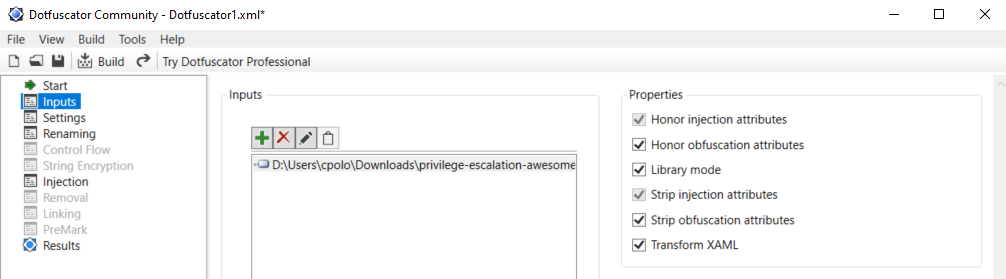
|

|
||||||
|
|
||||||
**IMPORTANT**: Note that Defender will higly probable delete the winpeas iintial unobfuscated version, so you need to set as expections the origin folder of Winpeas and the folder were the obfuscated version will be saved:
|
|
||||||

|
## Colors
|
||||||
</details>
|
|
||||||
|

|
||||||
|
|
||||||
## Checks
|
## Checks
|
||||||
|
|
||||||
@@ -284,5 +284,8 @@ If you find any issue, please report it using **[github issues](https://github.c
|
|||||||
|
|
||||||
All the scripts/binaries of the PEAS Suite should be used for authorized penetration testing and/or educational purposes only. Any misuse of this software will not be the responsibility of the author or of any other collaborator. Use it at your own networks and/or with the network owner's permission.
|
All the scripts/binaries of the PEAS Suite should be used for authorized penetration testing and/or educational purposes only. Any misuse of this software will not be the responsibility of the author or of any other collaborator. Use it at your own networks and/or with the network owner's permission.
|
||||||
|
|
||||||
|
## License
|
||||||
|
|
||||||
|
MIT License
|
||||||
|
|
||||||
By Polop<sup>(TM)</sup>, makikvues (makikvues2[at]gmail[dot].com)
|
By Polop<sup>(TM)</sup>, makikvues (makikvues2[at]gmail[dot].com)
|
||||||
|
|||||||
Reference in New Issue
Block a user